Software Development
Building a School Management System: The Ultimate Guide


Summary
A school management system connects academics, administration, communication, and daily operations in one platform. This guide covers its key features, development costs, customization, and how Q3 Technologies helps schools build scalable solutions.
Walk into almost any school admin office and you’ll still find binders of attendance sheets, fee receipts stapled in files, and a WhatsApp group doubling as the “official” parent communication channel. It works, sort of, until an admission season hits, a fee deadline passes, or a parent asks for a report card nobody can find in time.
This is exactly why the market is moving so fast. Grand View Research pegs the global education ERP market at roughly $16.4 billion in 2023, climbing toward $25.3 billion in 2026 on a 21.9% annual growth rate. That is not a niche trend — that is a wholesale shift in how institutions run themselves.
The good news is that fixing this doesn’t require a massive IT department. It requires the right partner for education software development, one who understands both the technology and the day-to-day chaos of running a school. That’s the gap Q3 Technologies was built to close.
Talk to any principal or school administrator and you’ll hear the same complaints: teachers spend their evenings manually calculating attendance percentages, the finance office chases down fee defaulters with phone calls instead of automated reminders, and parents find out about a missed assignment weeks too late. None of this is anyone’s fault — it’s simply what happens when a growing institution keeps running on tools that were never built to scale. The school management system that breaks out of this cycle aren’t necessarily the ones with the biggest budgets; they’re the ones who decide, early, to put every process on one connected platform instead of patching problems one spreadsheet at a time.
What is a School Management System?
A School Management System (SMS) is a centralized software platform that enables schools to manage and streamline academic, administrative, student, staff, and operational activities from a single system. It digitizes routine processes, reduces manual work, and provides real-time access to important school information. By bringing different functions together, an SMS helps improve efficiency, communication, data accuracy, and overall school administration.
What Features Should a School Management System Have?
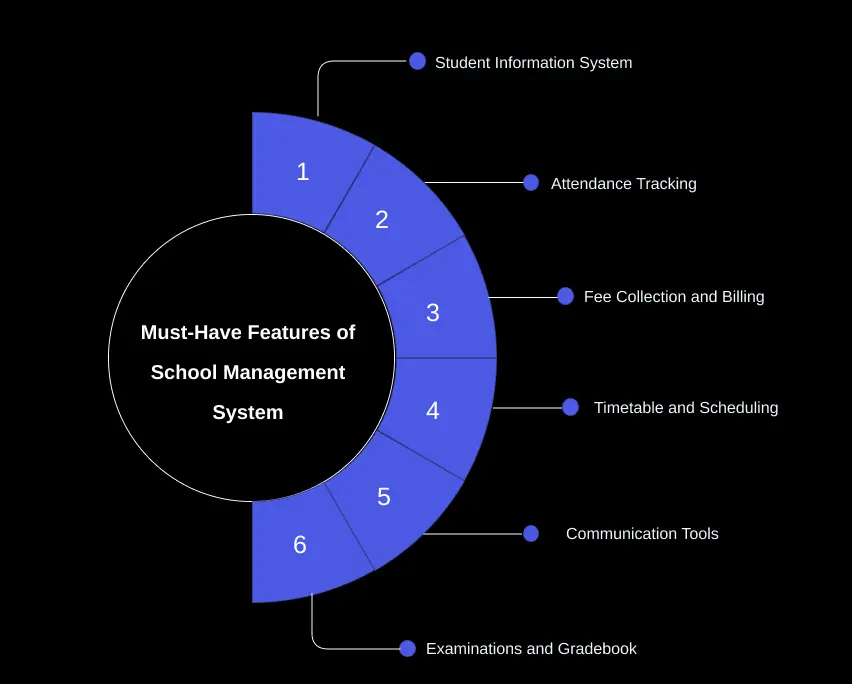
Not every platform needs every bell and whistle, but a genuinely useful system covers these core areas from day one:
- Student Information System: A student information system keeps centralized profiles, emergency contacts, medical notes, and enrolment documents in one searchable place instead of scattered folders.
- Attendance Tracking: Modern attendance tracking software logs daily or period-wise attendance digitally and fires off an automatic alert to parents the moment a child is marked absent.
- Fee Collection and Billing: A built-in fee management system handles fee structures, generates invoices, accepts online payments, and tracks outstanding balances without a single spreadsheet.
- Timetable and Scheduling: Good academic scheduling software automates class rosters and flags teacher or room conflicts before they turn into a Monday-morning scramble.
- Communication Tools: A dedicated parent-teacher communication portal replaces the group-chat chaos with announcements, report cards, and one-on-one messaging that actually gets read.
- Examinations and Gradebook: Teachers record marks, generate report cards, and track performance trends over the full academic year, not just one term.
Together, these building blocks are what most vendors describe simply as school management system features — and they’re the baseline you should expect from any serious build, not a premium add-on.
Ready to Build a Smarter School Management System?
Move beyond paperwork and disconnected spreadsheets with a secure, scalable platform tailored to your school’s unique needs.
What Features Do Schools Actually Use in Management Software?
Here’s what a lot of buyers get wrong: they chase flashy dashboards and AI widgets, then discover their staff only touch two or three modules every single day. Industry data backs this up — student management alone accounts for over 40% of feature usage across education ERP deployments, with attendance and fee collection close behind.
In our own project work, the pattern repeats itself constantly:
- Attendance and fee modules get opened every single day by administrative staff — these two alone justify the software spend.
- Parents check the communication portal far more than any report or analytics screen — they want quick answers, not dashboards.
- Teachers live in the gradebook and scheduling views during exam season and the start of each term.
The takeaway for anyone planning a build: prioritize the modules people will actually open every morning, then layer in the nice-to-haves once the essentials are rock solid.
Real-World Examples and Emerging Trends in School Management Systems
School management systems are evolving beyond basic administration, with AI, cloud computing, mobile apps, IoT, and real-time analytics becoming increasingly important in 2026.
- Smart Attendance: Schools are adopting RFID, biometric systems, and GPS-enabled transport tracking to automate attendance and send real-time parent alerts.
- Cloud-Based Platforms: Cloud systems enable administrators, teachers, students, and parents to access academic and administrative data from anywhere.
- AI-Powered Insights: AI can analyse attendance, grades, and engagement data to identify at-risk students, automate queries, and support personalised learning.
- Integrated Ecosystems: Modern platforms connect attendance, fees, LMS, payments, communication, and accounting through APIs, eliminating duplicate data entry.
- IoT-Enabled Campuses: Connected devices can support access control, transport tracking, asset monitoring, and campus safety.
- Real-Time Analytics: Dashboards give school leaders instant visibility into attendance, fee collection, academic performance, admissions, and operations.
- Stronger Security: Encryption, role-based access, MFA, audit logs, and secure APIs are becoming essential as schools manage increasingly sensitive data.
The key trend: Schools are moving towards secure, cloud-based, mobile-first, and AI-ready platforms that can scale as their needs evolve. Rather than building every feature at once, schools can start with core modules and gradually add analytics, AI, LMS integrations, and IoT capabilities.
What Is the Difference Between a School ERP and an LMS?
This question comes up in almost every discovery call we run, and the confusion is understandable since vendors often blur the terms.
- Student Information System (SIS): manages records specifically — demographics, enrollment, grades, and transcripts.
- School ERP: a full school ERP software suite that connects academics, finance, HR, inventory, and communication into a single database, going well beyond just student records.
- Learning Management System (LMS): focused purely on course delivery, assignments, and online content — it is where the actual teaching and learning happen.
In practice, the smartest institutions don’t pick one over the other — they invest in learning management system integration so the ERP and the LMS share data automatically instead of forcing staff to enter the same information twice. Curious how AI is starting to reshape that connected experience? We covered it in our piece on how AI agents are transforming education.
Is a School Management System Customizable?
Absolutely — and honestly, it should be a dealbreaker if a vendor tells you otherwise. Every school runs differently: a K-12 campus, a coaching institute, and a multi-branch school group all need different workflows, fee slabs, and reporting formats.
A well-built system gives you role-based dashboards for admins, teachers, students, and parents, white-label branding, and flexible modules you can switch on as you grow. It should also extend naturally to mobile. Our team’s mobile app development work lets schools put attendance, fees, and messaging directly into a parent’s pocket on iOS and Android, alongside our broader e-learning app development services< for institutions that also want a full online learning experience. We explored this shift in more depth in our article on the benefits of mobile apps in education.
How Much Does It Cost to Build a School Management System?
Cost is often the first question schools and education businesses ask. The total cost depends on the features, number of users, integrations, and level of customization. A realistic US-market estimate is:
- Basic package (single school, core modules): $15,000–$30,000 — Includes attendance, fee management, and a basic gradebook. It is a good option for schools that want to move away from spreadsheets.
- Mid-tier system (multiple branches, mobile apps, portals): $40,000–$80,000 — Includes parent and teacher apps, custom reports, online payments, and other useful integrations.
- Enterprise ERP (district or franchise scale): $100,000–$250,000+ — Includes HR, inventory, LMS integration, advanced analytics, custom workflows, and ongoing support and hosting.
The final cost depends on the number of modules, technology used, third-party integrations, security needs, and ongoing maintenance. Technologies such as React or Next.js for the front end and Node.js, Express, or Spring Boot for the back end can support large and scalable systems.
It is also important to plan for costs after launch. Hosting, security updates, bug fixes, new features, and technical support can add to the overall cost. Ask your development partner about these ongoing costs before starting the project so you have a clear budget from the beginning.
Is Your School Ready to Go Fully Digital?
Bring attendance, fees, academics, communication, and administration together in one powerful school management platform.
What Goes into Building One? A Quick Look Under the Hood
You don’t need to understand every technical detail to commission a great platform, but knowing the basics helps you ask sharper questions during vendor conversations.
- Frontend: fast, responsive interfaces built with React or Next.js so admins, teachers, and parents each get a dashboard tailored to their role.
- Backend: RESTful or GraphQL APIs built on Node.js with Express, or Java’s Spring Boot for larger, high-traffic deployments.
- Database: relational databases like PostgreSQL or MySQL for structured records, sometimes paired with MongoDB for flexible, fast-changing data.
- Role-based access control: administrators get full configuration rights, teachers can take attendance and enter marks, and students or parents get a clean, view-only window into schedules, grades, and fee receipts.
This is exactly the kind of architecture decision-making our engineers walk clients through before a single line of code gets written — because the tech choices you make in month one determine how easily the system scales in year five.
Case Study: How Q3 Technologies Streamlined Course Management for a Leading Institute
A well-known test-preparatory institute in India came to Q3 Technologies with a familiar problem: course details, test schedules, announcements, and fee payments were spread across disconnected tools, and parents had no single place to check on their child’s progress.
Our team designed and built a web-based course management platform that gave students and parents one home for everything school-related. Key outcomes included:
- A fully customizable dashboard for parents and students showing courses, tests, news, and upcoming class dates in one view.
- Live class access, online testing, and recorded lecture playback built directly into the platform, plus pre-booking for study materials.
- Multiple payment gateways integrated (including Paytm and card payments), giving the institute a clear, real-time view of collections.
The result was a smoother, more transparent experience for families and far less manual coordination for staff. You can read the full breakdown in our course management system case study.
Why Choose Q3 Technologies for Building a School Management System?
There is no shortage of vendors promising a school management platform. Here’s what actually sets our team apart:
- Deep education-sector experience: we’ve built student portals, e-learning apps, and full ERP systems for institutes, universities, and global education organizations.
- Modern, scalable tech stack: React, Next.js, Node.js, Spring Boot, PostgreSQL, and MongoDB, chosen based on what your school actually needs, not a one-size-fits-all template.
- End-to-end delivery: from requirement discovery and UI/UX design through development, QA, cloud deployment, and ongoing managed support. Our recent work on managed IT services for education shows how that support model plays out after launch.
- Proven global delivery: recognized among the top education app development companies for institutions across India, Australia, and beyond — read more in our roundup of leading education app development companies.
- Honest, transparent scoping: we tell you what you actually need before we tell you what we can build — no bloated proposals.
If you’re ready to move your school off spreadsheets and onto a system built for how your staff, teachers, and parents actually work, talk to the Q3 Technologies team and let’s map out what your platform should look like.
Expert Advice
A great school management system isn’t about having every feature under the sun — it’s about giving administrators, teachers, students, and parents the handful of tools they’ll actually use every day, wrapped in a platform that can grow with the institution. Whether you’re replacing paper registers for the first time or upgrading a system that’s outgrown itself, the right development partner makes the difference between a tool people tolerate and one they rely on. Q3 Technologies has spent years building exactly that for schools across the globe, and we’d love to build yours next.
FAQs
1. How can AI enhance a modern school management system?
AI can automate routine tasks such as fee reminders, attendance alerts, parent queries, and academic performance analysis. Predictive analytics can also help identify students who may need additional academic support.
2. Should a school management system be cloud-based or on-premise?
Cloud-based systems offer easier scalability, remote access, automated updates, backups, and lower infrastructure overhead. They are increasingly becoming the preferred architecture for modern school management platforms.
3. How can school management software protect sensitive student data?
A secure system should implement role-based access control (RBAC), encryption, audit logs, secure APIs, automated backups, and privacy-by-design practices to protect student, parent, academic, and financial data. Data governance and cybersecurity are increasingly critical as schools adopt AI and cloud platforms.
4. Can a school management system integrate with an LMS and other third-party platforms?
Yes. A scalable architecture can use APIs and integration layers to connect the school ERP with LMS platforms, payment gateways, biometric devices, communication tools, accounting software, and other education technologies.
5. How can a school management system support predictive analytics?
With centralized data from attendance, grades, fees, and student engagement, machine-learning models can identify patterns and generate early alerts for risks such as declining academic performance or attendance issues.
6. Can IoT and smart devices be integrated into a school management system?
Yes. Modern systems can integrate IoT devices for attendance, access control, environmental monitoring, asset tracking, and campus safety. Emerging smart-school architectures also combine IoT data with AI/ML, analytics, and centralized device management.

Table of content
- What is a School Management System?
- What Features Should a School Management System Have?
- What Features Do Schools Actually Use in Management Software?
- Real-World Examples and Emerging Trends in School Management Systems
- What Is the Difference Between a School ERP and an LMS?
- Is a School Management System Customizable?
- How Much Does It Cost to Build a School Management System?
- What Goes into Building One? A Quick Look Under the Hood
- Case Study: How Q3 Technologies Streamlined Course Management for a Leading Institute
- Why Choose Q3 Technologies for Building a School Management System?
- FAQs
Related Case Studies